Unsynchronised clocks are a network security hazard and, believe it or not, time discrepancies can lead to major breaches, causing untold disruption. What are the problems that can arise and how do you maintain time synchronisation? Find out here…
The stock market has been in the news a lot lately. As global uncertainty about national debts rise, the markets are in flux, with prices changing incredibly quickly. On a trading floor, every second counts and precise time is essential for global buying and selling of commodities, bonds and shares.
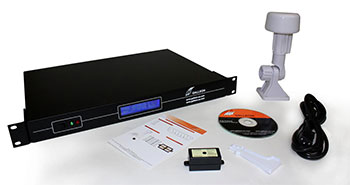
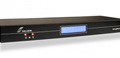
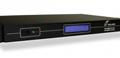
NTS 6001 from Galleon Systems
The international stock exchanges such as the NASDAQ and London Stock Exchange all require accurate and precise time. With traders buying and selling shares for customers across the globe, a few seconds of inaccuracy could cost millions as share prices fluctuate.
NTP servers linked to atomic clock timing signals ensure that the stock exchange keeps an accurate and precise time. As computers across the globe all receive the stock prices, as and when they change, these two use NTP server systems to maintain time.
The global timescale UTC (Coordinated Universal Time) is used as the basis for atomic clock timing, so no matter where a trader is on the globe, the same timescale prevents confusion and errors when dealing with stocks and shares.
Because of the billions of pounds worth of stocks and shares that are bought and sold on trading floors every day, security is essential. NTP servers work externally to networks, getting their time from sources such as GPS (Global Positioning System) or radio signals put out by organisations like the National Physical Laboratory (NPL) or the National Institute for Standards and Time (NIST).
The stock exchanges can’t use a source of internet because of the risk this could pose. Hackers and malicious users could tamper with the time source, leading to mayhem and cost millions and perhaps billions if the wrong time was spread around the exchanges.
The precision of internet time is limited too. Latency over distance can create delays, which could lead to errors, and if the time source ever went down, the stock markets could hit trouble.
It is not only stock markets that need precise and accurate time, computer networks across the globe concerned about security use dedicated NTP servers like Galleon Systems’ NTS 6001. Providing accurate time from both GPS and radio signals from NPL and NIST, the NTS 6001 ensure accurate, precise and secure time every day of the year.
With so much automated in the modern world and with computer networks running everything from finance to health services, keeping, storing and transferring information needs to be secure, accurate and reliable.
The time is crucial for computer systems to ensure this. Timestamps are the only information computers have to assess if a task has been completed, is due, or that information has been successfully received, sent or stored. One of the most common causes of computer errors comes from inadequate synchronisation of timings.
All computer networks need to be synchronised, and not just all the devices on a network, either. With so much global communication these days, all computer networks across the globe need to be synchronised together, otherwise when they communicate errors may occur, data can get lost, and it can pave the way for security problems as time discrepancies can be used by malicious users and software.
But how do computers synchronise together? Well, it is made possible by to innovations. The first is the international timescale, UTC (Coordinated Universal Time), kept true by atomic clocks and the same the world over, regardless of time-zones. The second, NTP (Network Time Protocol) is a computer program designed to keep PCs synchronised together.
Both NTP and UTC operate in tandem. The computer time server (NTP server) receives a UTC time source, either from radio, GPS (Global Positioning System) or the internet (although an insecure method of receiving UTC and not recommended).
NTP then distributes this time around a network, checking the time on each device at periodic intervals and adjusts them for any drift in time. Most computer networks that utilise NTP time servers in this way have each machine on the network within milliseconds of UTC time, enabling accurate and precise global communication.
NTP time servers are the only secure and accurate method of computer network synchronisation and should be used by any computer system that requires reliability, accuracy and security.
The UK speaking clock has been around for nearly eighty years. It was started in 1936 when time keeping started to become more important to people’s lives. Initially available only in the London it was rolled out to the whole country during World War II.
There have been four people that have had honour of providing the permanent voice to the speaking clock over the last 70. And over 70 million calls are made to the speaking clock making it an important from of accurate time but have you ever wondered how accurate it is and where the time comes from and how accurate it is?
The speaking clock is controlled by a major British telecoms company who took over the General Post Office (GPO) and the time was originally supplied by the National Physical Laboratory (NPL) who also provide the MSF signal that NTP time servers use as a source of atomic clock synchronisation.
NPL no longer help with the speaking clock but the time is still controlled by NTP servers, either GPS or MSF, which ensures that the time you hear on the end of the telephone is accurate.
NTP servers are also commonly used by computer networks to ensure that IT systems, from traffic light signals to the office PC are all running an accurate form of time.
NTP time servers can either receive the MSF radio signal broadcast by NPL or, more commonly now, GPS signals beamed directly from space.
Often network administrators opt to use online NTP servers that send time signals over the internet but these are not as accurate and cause security problems so it is far better to have a dedicated NTP time server to control the time if you wish to have a computer network that is running accurately.
Time synchronisation becomes more and more relevant as we become more dependent on the internet. With so many time sensitive transactions conducted across the globe, from banking and commerce to sending emails, the correct and accurate time is vital in preventing errors and ensuring security.
Increasingly, more and more people are relying on sources of internet time especially with many of the modern flavours of Microsoft’s Windows such as Windows 7 having NTP and time synchronisation abilities already installed.
Windows 7 and Time Synchronisation
Windows 7 will, straight out of the box, attempt to find a source of internet time; however, for a networked machine this does not necessarily mean the computer will be synchronised accurately or securely.
Internet time sources can be wholly unreliable and unsecure for a modern computer network. Internet time has to come through the firewall and as a gap is left for these time codes to come through, malicious software can take advantage of this firewall hole too.
Not only can the accuracy of these devices vary depending on the distance away your network is but also an internet time source very rarely comes direct from an atomic clock.
In fact, most internet time sources are known as stratum 2 devices. This means they connect to another device – a stratum 1 device – namely a NTP time server which gets the time directly from the clock and transmits it to the stratum 2 device.
Stratum 1 NTP time servers
For true accuracy and security, there is no replacement for your network’s own stratum 1 NTP server. Not only are these devices secure, receiving a time source externally to the firewall (often using GPS) but also they receive these signals direct from atomic clocks (The GPS satellite that transmits this signal has an onboard atomic clock that generates the time.
Accurate and reliable time is highly important and as networks and the internet gets faster and faster – accuracy becomes even more essential.
Computers internal clock systems are nowhere near accurate enough for many networked tasks. As simple quartz chronometers they will drift, by as a much as a second which perhaps wouldn’t be a problem if it wasn’t for the fact that all the clocks on the network may drift at different rates.
And as the world becomes more global, ensuring computer networks can talk to each other is also important meaning that synchronisation to the global timescale UTC (Coordinated Universal Time) is now a prerequisite for most networks.
Methods of Synchronisation
There are currently, only two methods for getting truly accurate and reliable time:
Use of an internet based time server from places like NIST (National Institute of Standards and Time) or Microsoft.
Use of a dedicated NTP time server – that receives external time sources such as from GPS
There are advantages and disadvantages to both types of sources – but which method is best?
Internet Time
Internet time has one great advantage – it is often free. However there are disadvantages to using an internet tie source. The first is distance. Distance across the internet can have a dramatic effect and as the internet gets quicker the distance has an even bigger effect meaning that accuracy become more tenuous.
Another disadvantage of internet time is the lack of authentication and the security risk it poses. Authentication is what the time protocol NTP (Network Time Protocol) uses to establish the true identity of a time source.
Furthermore, an internet time source can only be accessed through a network firewall so a UDP port has to be kept open providing a possible entrance for software nasties or malicious users.
NTP Time Server
NTP time servers on the other hand are dedicated devices. They retrieve a source of UTC externally to the firewall from either GPS or a long wave radio transmission. These come direct from atomic clocks (in the cased of GPS the atomic clock is onboard the satellite) and so can’t be hijacked by malicious users or viruses.
NTP servers are also far more accurate and are not impinged by distance meaning that a network can have millisecond accuracy all the time.
Keeping the clock on a PC system synchronised is important for many systems, networks and users that need time accuracy for applications and transactions. Nearly everything on a modern computer system is time reliant so when synchronisation fails all sorts of issues can arise from data getting lost and debugging becoming near impossible.
There are several methods of synchronising a computer system’s clock but the majority of them rely on the time synchronisation protocol NTP (Network Time Protocol).
By far the most common method is to make use of the myriad of online NTP time servers that relay the UTC time (Coordinated Universal Time). However, there are many common issues in using internet based time servers – here are some of them:
Can’t access the Internet time server
A common occurrence with Internet time sources is the inability to access them. This can be caused by several reasons:
• Too much traffic trying to access the server
• Website is down
• Your connection is down
The time from the time server is innacuurate
Most online sources of time are what are known as stratum 2 time servers. This means they get their time from another time server (stratum 1) that it connected to an atomic clock (stratum 0). If there is an error with the stratum 1 device the stratum 2 device will be wrong (and every device that is trying to get the time from it).
The time server is leading to security problems with the firewall
Another common problem caused by the fact that all online time servers need access through your firewall. Unfortunately this gives the opportunity for malicious users to make use of this back door into your system.
Eliminating Time Server Issues
Internet time sources are neither guaranteed to be accurate, reliable or secure so for any serious time synchronisation requirements an external source of time should be used. NTP time servers that plug into a network and receive the time from GPS or radio sources are a much more secure and reliable alternative. These NTP servers are also highly secure as they do not operate across the Internet.
Network Time Protocol (NTP) is a TCP/IP protocol developed when the internet was in its infancy. It was developed by David Mills of the University of Delaware who was trying to synchronise computers across a network with a degree of precision.
NTP is a UNIX based protocol but it has been ported to operate just as effectively on PCs and a version has been included with operating systems since Windows 2000 (including Windows 7, Vista and XP).
NTP, and the daemon (application) that controls it, is not just a method of passing the time around. Any system running the NTP daemon can act as a client by querying the reference time from other servers or it can make its own time available for other devices to use which in effect turns it into a time server itself. It can also act as a peer by collaborating with other peers to find the most stable and accurate time source to use.
One of the most flexible aspects of NTP is its hierarchical nature. NTP divides devices into strata, each stratum level is defined by its proximity to the reference clock (atomic clock). The atomic clock itself is a stratum 0 device, the closest device to it (often a dedicated NTP time server) is a stratum 1 device whilst other devices that connect to that become stratum 2. NTP can maintain accuracy to within 16 stratum levels.
Any network that needs to be synchronised, has to first identify and locate a time source for NTP to distribute. Internet sources of time are available but thee are often taken from stratum 2 devices that operate through the firewall. The only way NTP can peer the time is if the TCP/IP port is left open to allow the traffic through. This could lead to security issues as malicious users can take advantage of this firewall hole.
Dedicated NTP time servers find a source of time via GPS or radio signals and so don’t leave a network vulnerable to attack. By attaching a NTP time server to a router and entire network of hundreds and even thousands of devices can be synchronised thanks to NTP’s hierarchical structure.
Synchronization of computer networks is something that many administrators take for granted. Dedicated network time servers can receive a time source and distribute it amongst a network, accurately, securely and precisely.
NTP was developed when the internet was still in its infancy and Professor David Mills and his team from Delaware University were trying to synchronise the time on a network of a few machines. They developed the very earliest rendition of NTP which has continued to be developed to this very day, nearly thirty years after its first inception.
NTP was not then, and is not now, the only time synchronisation software, there are other applications and protocol that do a similar task but NTP is the most widely used (by far with over 98% of time synchronisation applications using it). It is also packaged with most modern operating systems with a version of NTP (usually SNTP – a simplified version) installed on the latest Windows 7 operating system.
NTP has played an important part in creating the internet we know and love today. Many online applications and tasks would not be possible without accurate time synchronization and NTP.
Online trading, internet auctions, banking and debugging of networks all rely on accurate time synchronisation. Even sending an email requires time synchronisation with email server – otherwise computers would not be able to handle emails coming from unsynchronised machines as they may arrive before they were sent.
NTP is a free software protocol and is available online from NTP.org However, most computer networks that require secure and accurate time mostly use dedicated NTP servers that operate external to the network and firewall obtaining the time from atomic clock signals ensuring millisecond accuracy with the world’s global timescale UTC (Coordinated Universal Time).
Atomic clocks are the ultimate in timekeeping devices. Their accuracy is incredible as an atomic clock will not drift by as much as a second within a million years, and when this is compared to the next best chronometers, such as electronic clock that can drift by a second in a week, an atomic clock is incredibly more precise.
Atomic clocks are used the world over and are the heart of many modern technologies making capable a multitude of applications that we take for granted. Internet trading, satellite navigation, air traffic control and international banking are all industries that rely heavily on
They also govern the world’s timescale, UTC (Coordinated Universal Time) which is kept true by a constellation of these clocks (although UTC has to be adjusted to accommodate the slowing of the Earth’s spin by adding leap seconds).
Computer networks are often required to run synchronized to UTC. This synchronisation is vital in networks that conduct time sensitive transactions or require high levels of security.
A computer network without adequate time synchronization can cause many issues including:
Loss of data
Difficulties in identifying and logging errors
Increased risk of security breaches.
Unable to conduct time sensitive transactions
For these reasons many computer networks have to be synchronized to a source of UTC and kept as accurate as possible. And although atomic clocks are large bulky devices kept in the confines of physics laboratories, using them as a source of time is incredibly simple.
Network Time Protocol (NTP) is a software protocol designed solely for the synchronisation of networks and computer systems and by using a dedicated NTP server the time from an atomic clock can be received by the time server and distributed around the network using NTP.
NTP servers useradio frequencies and more commonly the GPS satellite signals to receive the atomic clock timing signals which is then spread throughout the network with NTP regularly adjusting each device to ensure it is as accurate as possible.